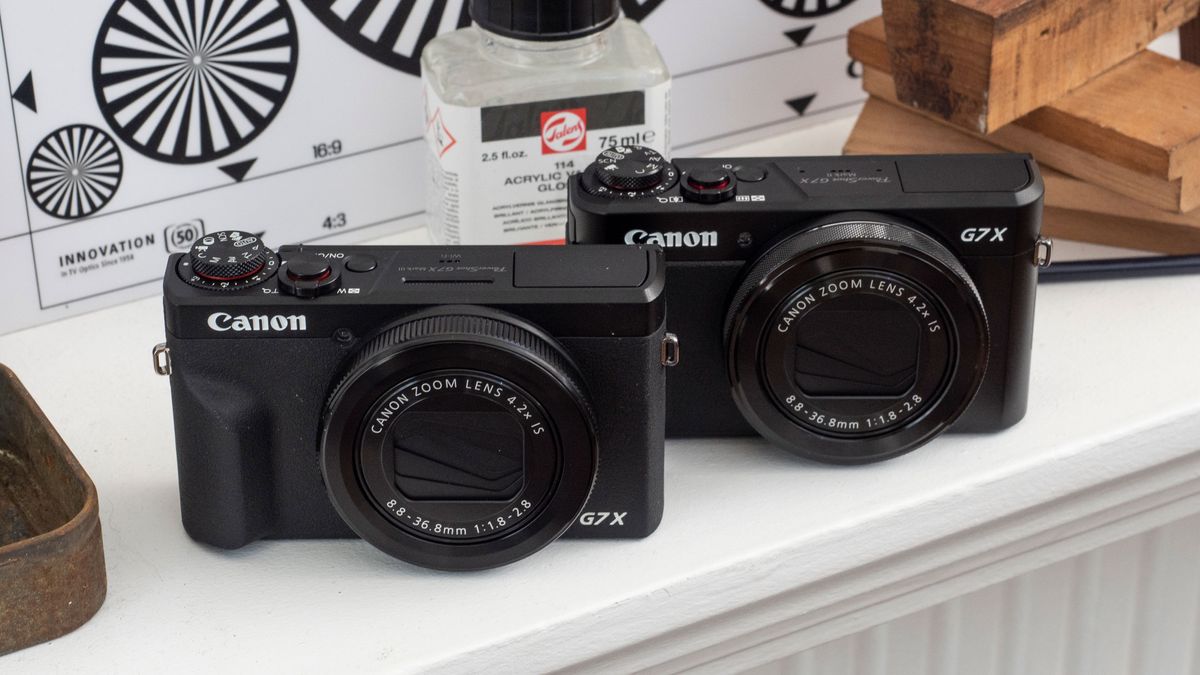
If you’ve spent any time on YouTube or TikTok in the last few years, you’ve seen this camera. You just might not have realized it. It’s that small, sleek brick tucked into the hands of travel influencers and lifestyle creators who seem to have skin that glows and backgrounds that blur just enough to look "pro." Honestly, the Canon PowerShot G7X Mark III shouldn't be this popular. On paper, it’s an older piece of tech in a world obsessed with 8K and AI-driven autofocus. But specs are liars. Real-world usage tells a completely different story, and that’s why this little machine still commands a premium price even years after its release.
It’s small. Really small.
You can shove it in a jacket pocket, which is basically the holy grail for anyone who doesn't want to carry a massive camera bag to brunch. But don't let the size fool you into thinking it's a toy.
The Canon PowerShot G7X Mark III is a Vlogger’s Best Friend (and Worst Enemy)
Most people buy this camera for one reason: the "Canon Color Science." It sounds like marketing fluff, but it’s real. Sony cameras might have faster autofocus, and Fujifilm might have those cool film simulations, but Canon makes humans look like humans. If you’re filming a vlog in harsh sunlight or a dim cafe, the Canon PowerShot G7X Mark III handles skin tones with a warmth that saves you hours in color grading. You just turn it on, flip the screen up, and look good.
It’s not all sunshine, though. When this thing first launched, the autofocus was, frankly, a bit of a disaster. It hunted. A lot. You’d be talking to the camera, and suddenly the background would be sharp while your face was a blurry mess. Canon eventually released firmware updates that mostly fixed this, but if you’re coming from a high-end smartphone, you might still find it a bit twitchy compared to the locked-on "sticky" focus of a modern iPhone.
Let’s talk about the lens. It’s a 24-100mm equivalent with an aperture of f/1.8-2.8. In plain English? It lets in a ton of light and gives you that blurry background (bokeh) that makes your videos look like they weren't shot on a phone. Most "vlogging" cameras have a fixed focal length, meaning you can't zoom. This one zooms. That makes it surprisingly versatile for things like street photography or capturing details at a concert where you can’t get close to the stage.
The Vertical Video Problem
Canon actually listened to creators with this model. It supports vertical video recording natively. If you rotate the camera, the metadata tells your phone or computer that it's a vertical clip. No more rotating files manually in Premiere Pro. It sounds like a small thing, but for someone pumping out three Reels a day, it’s a lifesaver.
Also, it has a mic input. This was the biggest "finally!" moment for the G7X series. The built-in mics are okay for a quiet room, but the moment you step outside into the wind, they’re useless. Being able to clip on a Rode Wireless Go or a small shotgun mic transforms this from a "nice camera" into a professional production tool.
What Most People Get Wrong About the 1-Inch Sensor
There’s this weird elitism in photography where people think if it’s not a "Full Frame" sensor, it’s garbage. That’s nonsense. The 20.1-megapixel stacked CMOS sensor in the Canon PowerShot G7X Mark III is a beast for its class. Because it’s a "stacked" sensor, it reads data incredibly fast. This allows for that 30 frames per second RAW burst mode, which is genuinely insane for a point-and-shoot.
You can literally hold down the shutter and capture a kid blowing out birthday candles or a skateboarder mid-flip, then pick the exact millisecond where the action looks best.
Does it overheat?
Kinda. If you’re trying to record 4K at 30p for an hour straight in a hot room, it’s going to shut down. This isn't a cinema camera. It’s a "moment" camera. If your style is long-form, 40-minute sit-down interviews, go buy a Canon EOS R6 or a Sony ZV-E10. But if you’re shooting 5-to-10-minute clips of your day, you’ll rarely hit that thermal ceiling.
I’ve seen people complain about the battery life, too. And yeah, it’s not great. You’re lucky to get an hour of actual filming out of one battery. If you’re buying this, just factor in the cost of two extra batteries and a wall charger. You’ll need them. Trust me.
The Secret Weapon: Live Streaming
One feature that gets ignored is the built-in YouTube Live streaming. You can literally connect the camera to Wi-Fi and go live directly to your channel without a computer or a capture card. In 2026, where "IRL streaming" is a massive genre, having a dedicated camera that does this better than a phone is a huge edge. The image quality is miles ahead of any smartphone front-facing camera, especially in low light.
Why You Might Hate This Camera
Let's be honest for a second. This camera isn't for everyone. If you’re a "spec-head," you’re going to find things to complain about.
- No Viewfinder: You have to use the screen. In direct, blinding sunlight, that can be a pain.
- Contrast Detection AF: It's not Phase Detection. It’s slower.
- Micro-USB is dead: Thankfully, this uses USB-C for charging and data.
But for most people? Those things don't matter as much as the feel of the image. There is a specific "crunchiness" and texture to the G7X images that looks "expensive." It doesn't have that over-sharpened, artificial look that AI-processed smartphone photos have. It looks like a movie.
Real World Performance: Not Just for Video
While everyone talks about vlogging, the Canon PowerShot G7X Mark III is a sleeper hit for travel photography. The lens is sharp. Like, surprisingly sharp. At the wide end (24mm), you can capture massive landscapes with plenty of detail in the corners. Zoomed in to 100mm, it becomes a decent portrait lens.
The built-in ND filter is also a massive win. If you want to take a photo of a waterfall and get that silky water look, or if you want to shoot video at f/1.8 in the middle of a sunny day without overexposing everything, you just toggle the ND filter on. No need to screw on glass filters to the front of the lens. It’s built right in.
Comparing the G7X Mark III to the Competition
| Feature | G7X Mark III | Sony ZV-1 II |
|---|---|---|
| Colors | Warm, natural skin tones | Clinical, accurate, sometimes cool |
| Lens | 24-100mm (More zoom) | 18-50mm (Wider, less zoom) |
| Build | Metal, premium feel | Plastic, very light |
| Screen | Tilts up/down | Flips out to the side |
The Sony ZV-1 II is the biggest rival here. It’s wider, which is better for "handheld" vlogging where you're holding the camera at arm's length. But the Canon feels better in the hand. It feels like a piece of precision machinery, whereas the Sony feels a bit like a computer.
Actionable Tips for New G7X Owners
If you just picked one up, don't leave it on "Auto." The "Auto" mode is fine, but it tends to overexpose.
- Turn on the "Facial Tracking" and make sure you've updated to the latest firmware (Version 1.3.0 or later). This is non-negotiable for the autofocus fix.
- Set a custom white balance. Canon's "Auto White Balance" is good, but if you're in a room with mixed lighting (like a lamp and a window), setting it manually will stop the colors from shifting mid-video.
- Use the Control Ring. That clicking ring around the lens? You can program it to change your aperture or your ISO. It makes you feel like you're actually shooting, not just tapping a screen.
- Get a Ulanzi or SmallRig grip. The camera is so small it can be hard to hold steady. A tiny tripod or a grip makes a world of difference for stabilization.
The Canon PowerShot G7X Mark III is a specialized tool. It’s for the person who wants better-than-phone quality without the headache of a professional mirrorless setup. It’s for the creator who values skin tones and portability over raw technical specs. Even years after its debut, it remains the "gold standard" for a reason: it just works the way creators need it to.
If you're looking to upgrade your content, stop looking at the 8K monsters and look at what’s actually in the pockets of your favorite creators. Odds are, it’s this.
Your Next Steps
- Check your firmware version immediately. If you aren't on the latest version, your autofocus will suffer. Download it from the Canon support site and follow the SD card installation instructions.
- Test the ND filter. Go outside on a bright day, set your camera to Manual (M), and turn the ND filter on and off. Notice how it allows you to keep your shutter speed low for that "cinematic" motion blur without blowing out the highlights.
- Invest in a high-speed SD card. Since this camera shoots 4K and high-speed RAW bursts, a slow card will cause the camera to "buffer" and stop recording. Look for a UHS-I U3 card with at least 170MB/s read speeds.